
ClipTranscribr: youtube-transcript.io Alternative for Clean YouTube Transcript Exports
If you are looking for a youtube-transcript.io alternative, ClipTranscribr focuses on one thing; exporting YouTube transcripts as SRT, VTT, TXT, and CSV with simple pricing and unlimited free single-video exports.
youtube-transcript.io is built for scalable transcript extraction with API support and high-volume plans. ClipTranscribr is built for creators and teams who want reliable exports, structured CSV and TXT formatting, and predictable costs.
- SSL Secured
- No Registration Required
- Fast Download
Alternatives to YouTube-Transcript.io Transcript YouTube Videos
When people search for alternatives to YouTube-Transcript.io transcript YouTube videos, they are usually deciding between an API-heavy tool and a simpler downloader. youtube-transcript.io offers a generous 25 transcript free tier and high-volume plans for 1000 to 10000+ transcripts per month; ClipTranscribr focuses on export quality and simplicity instead of complex credit systems.
If you primarily need to transcript YouTube videos and download those transcripts as SRT, VTT, TXT, or CSV, ClipTranscribr is often a better youtube-transcript.io alternative. It gives you unlimited free single exports, affordable bulk plans, and exports that are structured with metadata and headers for easier reuse in editing, research, or reporting workflows.
For teams that still require API access, youtube-transcript.io remains a strong choice. For everyone else who just needs a cheap YouTube transcript downloader, ClipTranscribr keeps things lean and predictable.
Tools for Extracting YouTube Captions or Transcripts; YouTube Transcription Services
Many users compare tools for extracting YouTube captions or transcripts YouTube transcription services and quickly discover that not all tools are built for the same job. youtube-transcript.io is positioned as a scalable service with API access and multi-channel extraction; ClipTranscribr is positioned as an affordable downloader with clean exports and no learning curve.
ClipTranscribr; export-first YouTube transcription
- Unlimited free single exports; no account required.
- SRT, VTT, TXT, CSV formats in every plan.
- Bulk exports from playlists and channels with predictable quota counts. No credits.
youtube-transcript.io; API-first YouTube transcription
- 25 free transcripts per month; no signup required.
- Bulk transcript extraction from 5-50 channels per request depending on plan.
- YouTube Transcript API access for developers on paid tiers.
If you are evaluating YouTube transcription services primarily to get files you can edit, upload, or analyze, ClipTranscribr is usually enough. If your team needs an API, channel batching up to 50 channels per request, or enterprise support, youtube-transcript.io is built with those requirements in mind.
ClipTranscribr vs youtube-transcript.io: Features & Pricing
| Feature | ClipTranscribr | youtube-transcript.io |
|---|---|---|
| Core focus | Simple transcript exports to SRT, VTT, TXT, CSV | Scalable transcript extraction with API and bulk channels |
| Free tier | Unlimited single-video exports; no signup | 25 transcripts per month; no signup |
| Bulk transcript export | Channels and playlists; fixed export counts per plan | 5-50 channels per request depending on plan |
| Export formats | SRT, VTT, TXT, CSV | TXT, SRT, VTT, CSV (per feature list) |
| Developer API | Not the primary focus | YouTube Transcript API on paid plans |
| Entry paid plan | $1.99/month 25 bulk exports/month | $9.99/month Plus; 1000 transcripts/month |
| Higher tiers | Starter $4.99 (350 exports); Pro $14.99 (1500 exports) | Pro credits: $24.99 (3000); $47.99 (6000); $79.99 (10000) |
| History retention | Depends on your own storage; exports are files you control | 90 days on Plus; unlimited on Pro and Enterprise |
| Known CSV behavior | Single consolidated CSV per export with headers and one row per segment (ClipTranscribr design) | Some users report separate CSV files per playlist item and missing headers |
When youtube-transcript.io Is Better
youtube-transcript.io is the right choice in several scenarios where ClipTranscribr does not try to compete directly. Being honest about these use cases helps you choose the tool that actually fits your workload.
You need very high volume extraction
If you need thousands of transcripts every month, youtube-transcript.io Pro tiers go from 3000 up to 10000 credits per month, and Enterprise handles 10000+ transcripts with custom arrangements. ClipTranscribr's Pro tier tops out at 1500 exports; beyond that scale, youtube-transcript.io is built for those loads.
You need extended API access
When you are building internal tools or products on top of transcript APIs, youtube-transcript.io's YouTube Transcript API and higher rate limits on paid plans are appealing. ClipTranscribr focuses on non-technical users and does not compete directly as an API-first solution.
You want multi-channel extraction per request
youtube-transcript.io supports between 5 and 50 channels per request depending on the plan, which is attractive for large monitoring and research projects that span many channels at once. ClipTranscribr focuses on straightforward channel and playlist exports with simpler usage limits.
You need enterprise support
For teams that require live support, custom integrations, or SLAs, the youtube-transcript.io Enterprise tier is designed to provide those options. ClipTranscribr is a leaner microSaaS with self-serve plans; it appeals more to smaller teams and individual creators.
Some users also report that the API can be inconsistent and that CSV exports may create separate files per playlist item; these are useful to test early if reliability and consolidated outputs are critical for your workflow.
Why ClipTranscribr Is Better for Cheap YouTube Transcript Downloads
ClipTranscribr positions itself as a cheap YouTube transcript downloader for people who care more about export quality and transparent pricing than about API complexity. It is especially strong for bulk YouTube transcript export when you still want human-readable files.
Better entry-level pricing
ClipTranscribr starts at $1.99/month for 25 bulk exports and $4.99/month for 350 exports. youtube-transcript.io's Plus plan starts at $9.99/month for 1000 transcripts. If you only need a few hundred exports per month, ClipTranscribr keeps your costs lower and your plan simpler.
Unlimited free single exports
youtube-transcript.io limits free usage to 25 transcripts per month. ClipTranscribr offers unlimited single-video exports for free, which is ideal for students, small creators, and anyone who occasionally needs a YouTube caption downloader free of monthly limits.
No credit tiers or token tracking
ClipTranscribr uses a small number of clearly named plans rather than multiple credit bundles. You do not have to think about tokens or micro-credit math; you only choose how many exports you need each month.
Focused on exports, not APIs
If you are not a developer, an API-first tool can feel like overkill. ClipTranscribr keeps the interface focused on paste-link; export; download flows, which makes it easier for non-technical teams to adopt quickly.
Why ClipTranscribr CSV and TXT Exports Are More Professional
Both ClipTranscribr and youtube-transcript.io support TXT, SRT, VTT, and CSV formats. The difference is in how those files are structured once you download them. ClipTranscribr is designed for data analysis, client deliverables, and long-term readability.
Self-documenting TXT and CSV exports
- Each file includes video title, video URL, and generation timestamp at the top.
- This metadata makes files self-documenting and easier to share with clients or teammates.
Proper CSV headers and structure
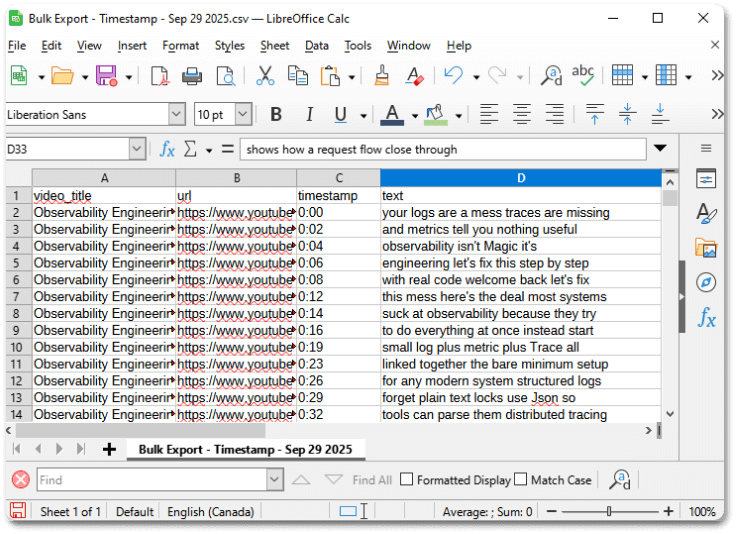
- CSV exports include clear column headers, such as timestamp and text.
- One row per transcript segment makes filtering, searching, and pivoting in Excel or databases straightforward.
Consistent timestamp formatting
- Timestamps follow a consistent [H:MM:SS] style, making parsing and automation easier.
- This avoids awkward line breaks or inconsistent spacing that can appear in raw exports.
Consolidated CSV for bulk exports
- ClipTranscribr can consolidate bulk exports into a single CSV file for easier analysis.
- Some users report that youtube-transcript.io creates separate CSVs per playlist item, which adds extra steps to combine files manually.
ClipTranscribr CSV Format:
YoutubeTranscript.io CSV Format:
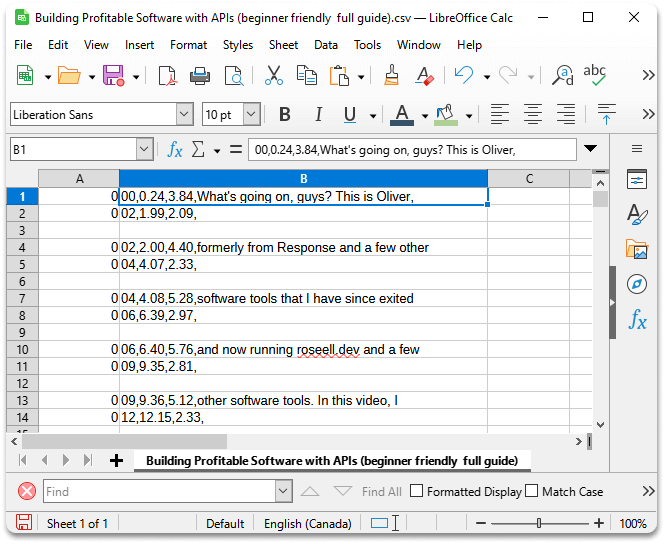
These differences are subtle but important if you are using transcripts for data pipelines, research dashboards, or any workflow where formatting and structure matter as much as the text itself.
Download YouTube Captions; Alternatives to YouTube-Transcript.io
Many search queries revolve around download YouTube captions alternatives to YouTube-transcript.io how to download captions YouTube. ClipTranscribr is designed to answer that search intent directly; paste a link, choose a format, and download captions as SRT, VTT, TXT, or CSV.
How to download YouTube captions with ClipTranscribr
- 1.Visit ClipTranscribr.com and paste your YouTube video, playlist, or channel URL.
- 2.Select your preferred export format; SRT, VTT, TXT, or CSV.
- 3.Click the export button; processing usually takes seconds for a single video and a few minutes for playlists.
- 4.Download your files; for bulk exports, you can download a ZIP archive that contains all the transcripts together.
If you need YouTube caption download options besides youtube-transcript.io, ClipTranscribr offers a more focused experience: no tokens, no credit packs, and no requirement to understand an API before you see value.
YouTube Caption Download Options Besides YouTube-Transcript.io
When users search for YouTube caption download options besides youtube-transcript.io, they are often looking for a simpler tool that feels less like an API platform and more like a downloader. ClipTranscribr fills that space by emphasizing unlimited free single exports and easy bulk plans.
Quick decision guide
- Choose ClipTranscribr if you want cheap YouTube transcript downloader plans with clean SRT, VTT, TXT, and CSV exports.
- Choose youtube-transcript.io if you need 6000-10000+ transcripts per month or deep API integration with your own systems.
- Test both free tiers if you are unsure; 25 free transcripts on youtube-transcript.io vs unlimited free single exports on ClipTranscribr.
Pricing: ClipTranscribr vs youtube-transcript.io
Both tools offer a free tier; the main difference is how quickly pricing escalates when you need more transcripts. ClipTranscribr is tuned for affordable bulk YouTube transcript export; youtube-transcript.io is tuned for higher scale and API heavy workflows.
ClipTranscribr
- Free: Unlimited single-video exports; SRT, VTT, TXT.
- Trial: $1.99/month; 25 bulk exports.
- Starter: $4.99/month; 350 bulk exports.
- Pro: $14.99/month; 1500 bulk exports.
youtube-transcript.io
- Free: 25 transcripts per month; no signup required.
- Plus: $9.99/month; 1000 transcripts/month; 90-day history; 5 channels per request.
- Pro: $24.99, $47.99, $79.99/month for 3000, 6000, 10000 credits; 50 channels per request; unlimited history.
- Enterprise: Custom pricing; 10000+ transcripts; live support.
Which pricing model fits you?
If you consistently need 1000+ transcripts per month and plan to use an API heavily, youtube-transcript.io Plus or Pro may fit better. If you want a cheap YouTube transcript downloader for dozens or a few hundred exports per month, ClipTranscribr usually provides the lower total bill.
FAQ: youtube-transcript.io Alternative
Is ClipTranscribr a good youtube-transcript.io alternative?
Yes. ClipTranscribr is a strong youtube-transcript.io alternative if you want simple, reliable transcript exports without AI features or complex credit tiers. It focuses on SRT, VTT, TXT, and CSV exports with straightforward pricing.
Does youtube-transcript.io have a free plan?
Yes. youtube-transcript.io offers a free plan with 25 transcripts per month and no signup required. ClipTranscribr offers unlimited free single-video exports with no monthly limits and no signup required.
How much does youtube-transcript.io cost compared to ClipTranscribr?
youtube-transcript.io Plus starts at $9.99/month for 1000 transcripts with 90-day history retention. Pro tiers go up to $79.99/month for 10000 credits. ClipTranscribr bulk plans start at $1.99/month for 25 bulk exports and $4.99/month for 350 exports, with a Pro plan at $14.99/month for 1500 exports.
Do both ClipTranscribr and youtube-transcript.io support bulk YouTube transcript export?
Yes. Both tools support bulk transcript extraction from channels and playlists. youtube-transcript.io supports 5 to 50 channels per request depending on plan. ClipTranscribr focuses on fast, simple bulk exports with clean SRT, VTT, TXT, and CSV files.
What export formats does ClipTranscribr support?
ClipTranscribr supports SRT, VTT, TXT, and CSV exports. All files include consistent timestamps, and CSV exports use proper headers and one row per transcript segment to make data analysis and importing into other tools easier.
What export formats does youtube-transcript.io support?
According to their feature list, youtube-transcript.io supports TXT, SRT, VTT, and CSV. However, some users note that CSV bulk exports can create separate files per playlist item and may lack headers, which adds work for data analysis workflows.
Does ClipTranscribr include AI chat or AI summaries like some competitors?
No. ClipTranscribr does not include AI chat or AI summaries. It focuses on accurate transcript extraction and professional file exports. If you need AI chat or AI summarization tied to transcripts, youtube-transcript.io or similar tools may be a better fit.
Are there known issues with youtube-transcript.io?
Some users report API inconsistency where transcripts occasionally fail to return even when captions exist, CSV exports that create separate files per playlist item, and error handling that can be unclear. These are user reports; if the API is mission-critical, it is wise to test it early.
When is ClipTranscribr better than youtube-transcript.io?
ClipTranscribr is better when you want unlimited free single exports, simpler pricing, cleaner CSV and TXT exports with metadata and headers, and when you do not need API access or very high volume tiers like 10000+ transcripts per month.
When is youtube-transcript.io better than ClipTranscribr?
youtube-transcript.io is better when you need very high volume extraction such as 6000-10000+ transcripts per month, extended API access with higher rate limits, or enterprise features like live support and multiple channel extraction in one request.
Ready to try a youtube-transcript.io alternative?
Start a Free ExportExport YouTube Transcripts Without Credit Headaches
ClipTranscribr gives you unlimited free single exports and affordable bulk plans for SRT, VTT, TXT, and CSV. Perfect if you just want reliable exports and simple pricing.
No signup required for single-video exports • Bulk plans from $1.99/month.