
YouTube Transcript Bulk Downloader - TXT, SRT, VTT, CSV Formats
Turn any YouTube video, playlist, or channel into clean TXT, SRT, VTT, or CSV files without the manual copy-paste.
Exports the transcript exactly as YouTube provides. French stays French, Japanese stays Japanese. No forced translation.
- SSL Secured
- No Registration Required for Trial
- Fast Download
YouTube Doesn't Offer Transcript Export - Here's What ClipTranscribr Does Instead
YouTube's transcript panel is built for on-page reading, not export. Here's the gap, and what ClipTranscribr does to close it.
What YouTube Provides
- The built-in transcript viewer has no download option, just a scrollable panbel you'd copy by hand
- No native way to export as TXT, SRT, VTT or CSV
- No option to pull transcripts for a playlist or channel at once
- Copying transcripts manually from a large playlist takes hours, one video at a time
What ClipTranscribr Does
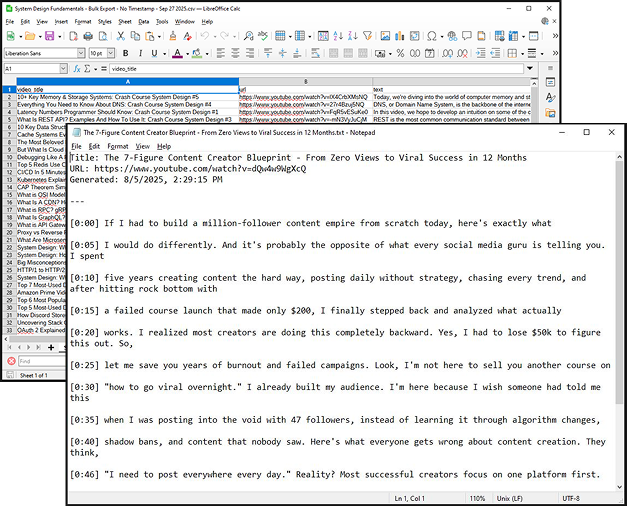
- Extracts the captions YouTube already has and exports them as TXT, SRT, VTT, or CSV
- Single videos export in seconds; playlists and channels export in batches of up to 400
- No signup needed for single-video exports; paste a URL and download
- Bulk plans start at $1.99/mo
What Makes ClipTranscribr different
Three things that matter if you're choosing a transcript export tool: speed, file quality, and how bulk exports actually work.
Processing Speed
Single video exports finish in seconds. Medium playlists (40-50 videos) take about 1-2 minutes. Large playlists (300+) videos take around 3-4 minutes per 400-video batch.
File Quality
Every export is a properly structured file( not raw copied text) ready to open in a video editor, spreadsheet, or notes app. Choose SRT,VTT,CSV, or TXT depending on what you are using it for.
How Bulk Export Works
Paste a channel or playlist URL and choose a format. ClipTranscribr pulls every available transcript in batches of up to 400 videos, no browser extensions or scripts required.
Choose Your Plan. Or Use Free Forever
Whether you need a quick transcript for a single video or want to download hundreds at once, ClipTranscribr makes it simple. No hidden fees. Transparent pricing. Get started instantly.
Free (No signup needed)
Instantly export single YouTube videos as SRT, VTT or TXT.
- No payment info needed.
- No login required.
- Perfect for one-off transcripts, captions or note-taking
Need more volume? Upgrade to one of our paid bulk plans below.
Trial
Start your bulk transcript exports with our affordable Trial Plan. Enjoy 25 transcripts every month at just $1.99; perfect for creators and small teams testing the power of bulk exports without big commitments. Upgrade seamlessly when you're ready for more volume with our Starter and Pro plans.
- 25 YouTube transcripts per month
- Bulk channel/playlist extraction
- CSV + TXT export formats
- Timestamp options available
- Email support
Starter - Most Popular
Perfect for individual creators and students. Extract YouTube transcripts from entire channels and playlists in seconds. Get organized CSV and TXT files with timestamps. Email support included.
- 350 YouTube transcripts per month
- Bulk channel/playlist extraction
- CSV + TXT export formats
- Timestamp options available
- Email support
Pro
Designed for power users, agencies, and growing teams. Everything in Starter plus 4x more transcripts, priority support, and early access to new features. Perfect for heavy content research and analysis.
- 1,500 YouTube transcripts per month
- All Starter features included
- Priority email support
- Early access to new features
Perfect for
Students & Educators
Convert lecture videos and full course playlists into searchable text for study notes, offline review, or accessible course materials. Useful for a student scanning hours of lecture for one topic, or an educator producing transcripts for students who are deaf or hard of hearing.
Content Creators & Repurposers
Turn a video library into written content without transcribing by hand. Bulk export transcripts from your own channel and repurpose them into blog posts, captions, newsletters, or scripts.
Video Editors & Captioners
Download properly timed SRT or VTT files for client videos or captioning work. ClipTranscribr pulls the existing caption trackstraight from YouTube; useful for editors handling subtitle files across a playlist or channel.
Researchers, Analysts & Marketers
Export transcripts from channels or playlists as CSV for competitive research, content audits, or trend analysis; structured data you can filter and search in a spreadsheet instead of watching videos manually.
Podcasters & Audio Producers
If your episodes are on YouTube, export transcripts as text or subtitle files for show notes, episode descriptions, or repurposed content without writing up what you already said.
Transcript Export Requirements
& What You Should Know:
- Videos must have captions or transcripts available.
- Videos and playlists must be public. Private, unlisted, or restricted content will not work.