
YouTube to SRT Converter - Export Subtitles in Bulk
Convert YouTube videos, playlists, or entire channels into ready-to-use SRT subtitle files compatible with Premiere Pro, Final Cut, DaVinci, and every major video editor.
Whether you're adding subtitles, repurposing content, or improving accessibility, get accurate SRT files in seconds. Single-video exports are free. Bulk exports require a subscription.
- SSL Secured
- No Registration Required for Trial
- Fast Download
What is the SRT Format?
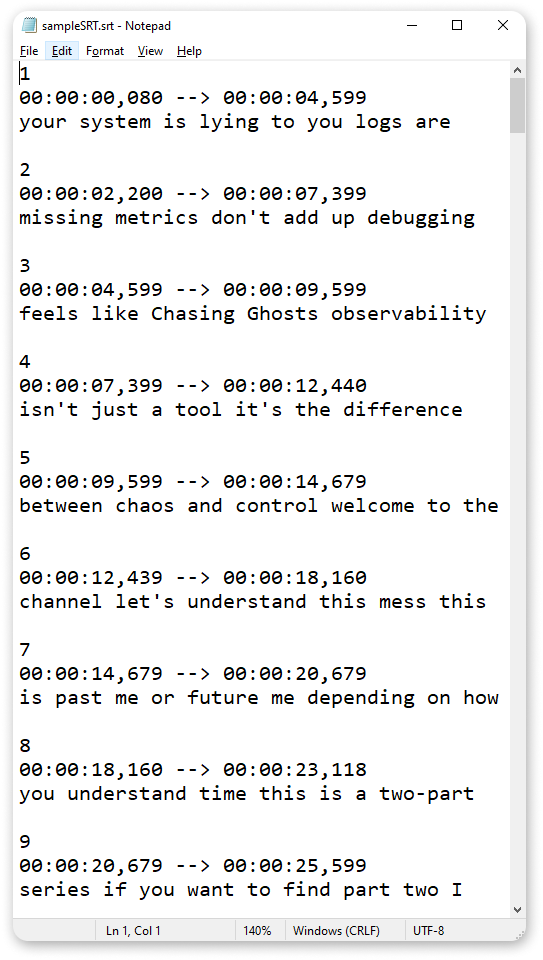
SRT (SubRip Subtitle) is the most universally-supported subtitle/caption file format. It's a plain-text subtitle file that works with almost every video editing tool, media player and online platform.
Each subtitle in an SRT file uses a simple, standardized structure:
- Sequence number — identifies the order of each subtitle block.
- Timecode — start and end timestamps in the format
HH:MM:SS,mmm → HH:MM:SS,mmm, telling the player when to show and hide each subtitle. - Subtitle text — the actual caption content; plain text (optionally with basic styling tags), synchronized with the video.
The simplicity of SRT: plain text, predictable structure, wide compatibility is exactly what makes it ideal for video editing, caption uploads, and cross-platform subtitle usage.
When you use ClipTranscribr to convert YouTube transcripts to SRT, you get clean, correctly formatted .srt files ready to import into editing software or upload to video platforms. No manual timestamp editing, no formatting hassles.
Why Convert YouTube Captions to SRT?
Video Editing & Post-Production
Subtitle files in .srt format are accepted by all major video editors: Premiere Pro, Final Cut, DaVinci, and more. No more manual time-coding. Exporting from YouTube and converting to SRT saves hours of editing work.
Content Repurposing Across Platforms
Use the same subtitles on YouTube, Instagram, TikTok, LinkedIn, or Facebook. With SRT files exported once, you can repurpose video content quickly and uniformly for any platform.
Accessibility & Compliance
Subtitles make videos accessible to viewers who are deaf, hard-of-hearing, non-native speakers, or watching muted. SRT-based captions promote inclusion and meet accessibility expectations for many audiences and organizations.
Multilingual & Global Reach
YouTube often auto-generates captions in many languages. With SRT exports, you can reuse or translate subtitles to reach global audiences increasing engagement and inclusivity.
How to Convert YouTube to SRT in 3 Simple Steps
Turn YouTube videos, playlists or channels into ready-to-use .srt subtitle files with no technical skills needed.
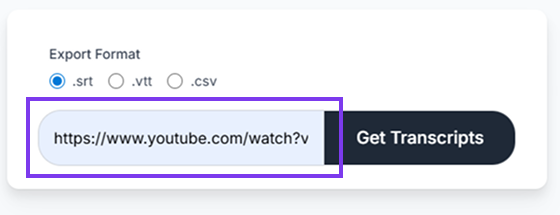
Paste your YouTube URL
Copy the link of any public YouTube video, playlist or channel then paste it into ClipTranscribr's converter.
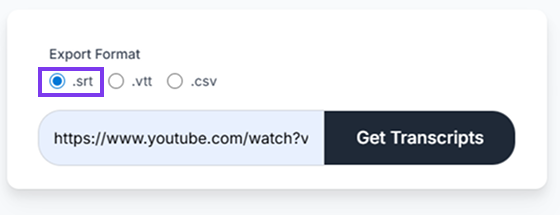
Select "SRT" as export format
From the format menu, choose SRT, the industry-standard subtitle format compatible with video editors, media players, and online platforms.
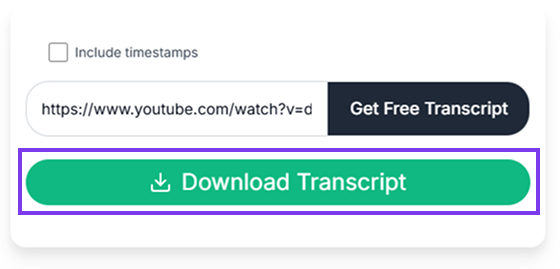
Download your SRT subtitle file
Once processing completes, click "Download." For playlists or channels you'll get a ZIP archive containing .srt files for each video organized by title.
Processing Speed
- Single video (5 minutes): Few seconds
- Long video (10+ hours): Under 1 minute
- Playlist (50 videos): ~1.5 minutes
- Large channel (300 videos): ~3.5 minutes
SRT vs Other Subtitle Formats
Understanding key differences between subtitle formats helps you choose the right one for your use case: editing, web publishing, data exports, or captions.
SRT vs VTT (WebVTT)
SRT (SubRip) is a minimal plain-text subtitle format. Each subtitle block has a sequential number, time-codes, and subtitle text. By contrast, VTT (WebVTT)supports extra features like styling, positioning, metadata and more advanced cue customization making it better suited for web/video-player use. If you're editing or uploading to video editors, SRT is usually the best choice. If you embed video on a website or need advanced subtitle styling/metadata, VTT may fit better.
SRT vs Plain-Text (TXT)
Plain-text transcript (TXT) files contain only the video dialogue with optional timestamps (hh:mm:ss) if you choose that export mode. They're great for reading, editing, repurposing content, creating blog articles or notes, or for workflows where synchronized subtitles aren't needed.If you need synced subtitles for video editors, choose SRT format.
SRT vs CSV / Data Export
CSV export is ideal for data analysis, transcript mining, or bulk processing, especially when working with many videos, playlists, or channels. However, CSV files are not compatible with video players or editing software. For proper subtitles and synchronized captions, SRT remains the standard.
Who Uses YouTube to SRT Conversion Tools?
From independent creators to video agencies, professionals across industries benefit from exporting YouTube videos to SRT subtitle files.
Video Editors & Post-Production Teams
Need subtitles for client videos or editing projects? Export SRT files from YouTube tutorials or reference videos, then import them into Premiere Pro, Final Cut or DaVinci. Saves you hours of manual time-coding.
Content Creators & Repurposers
Planning social-media clips, blogs, or translation? Export once, then repurpose your YouTube videos across Instagram, TikTok, LinkedIn, or Facebook with subtitles ready to go.
Marketing Agencies & Brands
Create subtitled ads, testimonials, or branded videos for clients. Extract YouTube transcripts, convert to SRT, add captions and publish across platforms quickly, without manual transcription effort.
Educators, Trainers & Course Creators
Turn YouTube lecture videos into captioned course content or study material. Export clean SRT or timestamped transcripts for subtitles, class notes, or offline accessibility ideal for learners and inclusive education.
Bulk Export: Convert Entire Playlists to SRT
Save hours of manual work by converting entire YouTube playlists to SRT format at once. Our bulk export feature processes multiple videos simultaneously, delivering all subtitle files in a convenient ZIP archive.
Use Cases for Bulk SRT Export
Whether you're managing a content library, creating educational materials, or repurposing video content, bulk export streamlines your workflow.
Channel Repurposing
Export every video from your channel, create subtitle templates for future uploads.
Competitor Research
Analyze competitor video scripts by exporting their entire channel as SRT files.
Educational Archives
Download all lectures from a professor's YouTube channel for offline study.
How Bulk Export Works
Simply paste the URL of any YouTube playlist into our converter. Our system automatically detects all videos in the playlist, processes them in parallel, and generates individual SRT files for each video. You'll receive a single ZIP file containing all subtitle files, organized with clear naming conventions that match the original video titles. The process is fast, reliable, and handles playlists with hundreds of videos effortlessly.
SRT File Compatibility
SRT is the most universally compatible subtitle format, working seamlessly across all major platforms, software, and devices. Export once, use anywhere.
Video Editing Software
- Adobe Premiere Pro
- Final Cut Pro X
- DaVinci Resolve
- Sony Vegas Pro
- iMovie
- Camtasia
Media Players
- VLC Media Player
- Windows Media Player
- QuickTime
- MPC-HC
Video Platforms
- YouTube
- Vimeo
- TikTok
- Twitter/X Video
Simple, Transparent Pricing
Our simple pricing plans give you exactly the SRT conversion access you need. Whether you require occasional YouTube video transcripts or bulk SRT downloads from entire channels and playlists, ClipTranscribr has the perfect plan. Start right away, no signup is required for free individual SRT files. Enjoy seamless upgrades and straightforward access to fast, reliable YouTube transcript to SRT conversion, with no hidden fees.
Free
(No Signup Required)
Get Started Free- Export single YouTube videos to SRT
- TXT, SRT, VTT formats available
- Instant download
Trial
Perfect for individual creators
Subscribe Now- 25 bulk exports per month
- All formats available (TXT, SRT, VTT, CSV)
- Bulk export from playlists and channels
- Email support
Starter
Ideal for video editors managing client projects
Subscribe Now- 350 bulk exports per month
- Everything in Trial
Pro
Great for agencies and researchers
Subscribe Now- 1500 bulk exports per month
- Everything in Starter
Frequently Asked Questions
Start Converting YouTube to SRT Now
Export YouTube transcripts as SRT subtitle files in seconds. Free for single videos, bulk export for $1.99/month. No complicated software, just paste a URL and download.