
YouTube to VTT Converter - Export WebVTT Captions for Web Videos
Convert YouTube videos to VTT (WebVTT) caption files in seconds. ClipTranscribr extracts existing transcripts from YouTube and exports them as properly formatted VTT files ready for HTML5 video players, websites, and web applications. If you're embedding videos on your website, building a video platform, or working with HTML5 video players, VTT is the format you need.
Try single video exports for free. Bulk exports (playlists or channels) require a paid subscription.
- SSL Secured
- No Registration Required for Trial
- Fast Download
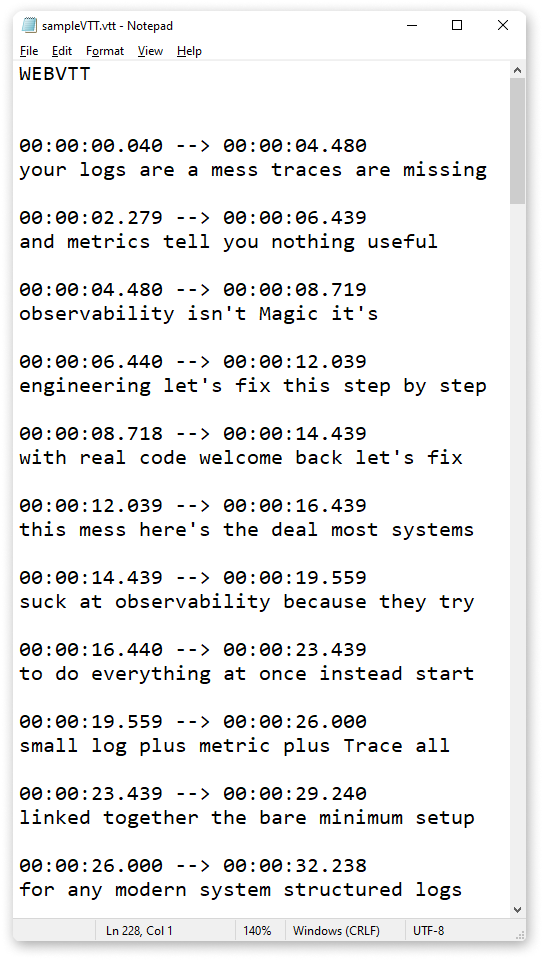
What is VTT Format?
VTT stands for Web Video Text Tracks. It's the caption format designed specifically for HTML5 video on the web. While SRT is designed for video editing software, VTT is designed for web browsers and HTML5 video players.
Every modern web browser supports VTT natively. Add a VTT file to your HTML5 video with a few lines of code.
Why Convert YouTube to VTT?
Web Developers Need VTT for HTML5 Video
If you're building websites with embedded videos, you need captions in VTT format. HTML5 video players read VTT natively, no plugins or special software required.
Video Platforms Require VTT
Are you building a video course platform, membership site, or video library? Most modern video hosting solutions (Vimeo, Wistia, JW Player) accept VTT files for captions.
Accessibility Compliance
WCAG accessibility standards require video captions. VTT files ensure your web videos are accessible to users with hearing impairments.
Better SEO for Video Content
Search engines can read VTT captions. Adding VTT files to your embedded videos helps Google and other search engines understand and index your video content, potentially improving search rankings.
How to Convert Youtube to VTT in 3 Steps
Converting YouTube videos to VTT format is simple and takes just three easy steps. No technical knowledge required.
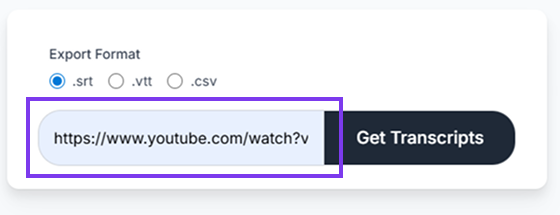
Paste Your YouTube URL
Copy the URL of any public YouTube video, playlist, or channel. Paste it into ClipTranscribr's converter.
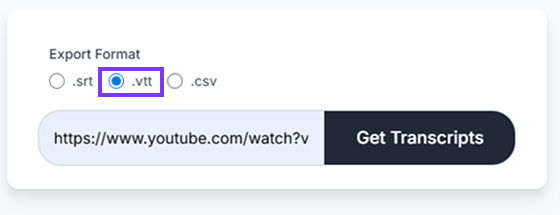
Select VTT Format
Choose VTT from the export formats list. Timestamps are automatically included in proper VTT format.
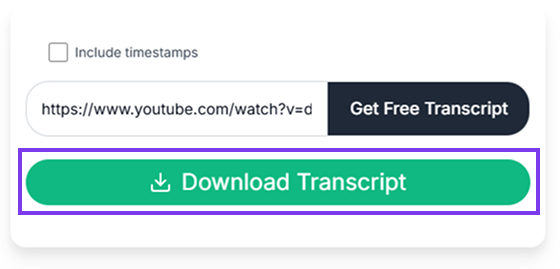
Download Your VTT File
For single videos, your VTT file downloads immediately. For playlists or channels, you'll get a ZIP file with all VTT files organized by video title.
Processing Speed
- Single video (5 minutes): Few seconds
- Long video (10+ hours): Under 1 minute
- Playlist (50 videos): ~1.5 minutes
- Large channel (300 videos): ~3.5 minutes
VTT vs SRT: What's the Difference?
VTT is for Web Browsers
- HTML5 video players (Chrome, Firefox, Safari, Edge)
- Web-based video platforms
- Embedded videos on websites
- Progressive Web Apps (PWAs)
SRT is for Video Editing Software
- Adobe Premiere Pro
- Final Cut Pro
- DaVinci Resolve
- Desktop video players (VLC, QuickTime)
Key Differences:
| Feature | VTT (WebVTT) | SRT (SubRip) |
|---|---|---|
| File Header | Starts with "WEBVTT" | No header required |
| Decimal Separator | Uses dots (00:00:00.000) | Uses commas (00:00:00,000) |
| Primary Use | Web browsers, HTML5 video | Video editing software |
| Styling Support | CSS styling available | No styling |
| Metadata | Can include metadata | Text only |
| Export Now |
Which should you use?
- Embedding video on a website? -> VTT
- Editing video in Premiere or Final Cut? -> SRT
- Building a video platform? -> VTT
- Creating subtitles for local video files? -> SRT
Who Uses YouTube to VTT Converters?
Web Developers
Convert YouTube tutorials or demo videos to VTT, then embed them on your documentation site with searchable captions.
Online Course Creators
Export your YouTube course videos as VTT files. Upload them to your course platform (Teachable, Thinkific, Kajabi) with captions already included.
Marketing Teams
Repurpose YouTube video content for your company website. Add VTT captions to improve accessibility and SEO.
Video Platform Builders
Building a custom video platform? Export VTT captions from existing YouTube content to jumpstart your caption library.
Membership Site Owners
Migrate video content from YouTube to your membership site. Include VTT captions for better user experience and accessibility compliance.
VTT File Compatibility
Web Browsers (HTML5 Video)
- Google Chrome
- Mozilla Firefox
- Safari (macOS, iOS)
- Microsoft Edge
- Opera
Video Platforms & Custom Players
- Vimeo
- Wistia
- JW Player
- Video.js
- Plyr
- Custom video players
Learning Management Systems
- Teachable
- Thinkific
- Kajabi
- Podia
- LearnDash (WordPress)
Content Management Systems
- WordPress (native HTML5 video)
- Drupal
- Joomla
- Custom video players
Bulk Export: Convert Playlists to VTT
ClipTranscribr's bulk export feature lets you convert entire YouTube playlists or channels to VTT files in minutes.
Use Cases for Bulk VTT Export
Course migration
Export all course videos from YouTube, upload to your LMS with VTT captions.
Website video library
Convert your entire YouTube channel to VTT for embedding on your company website.
Platform development
Build a video platform with captions ready from day one.
How It Works
Paste a playlist or channel URL. ClipTranscribr extracts transcripts from every video and generates individual VTT files. Download a ZIP file with all VTT files named by video title, ready to upload.
ClipTranscribr exports clean VTT files without custom styling by default. You can add styling manually after export if needed.
Simple, Transparent Pricing
Free
(No Signup Required)
Get Started Free- Export single YouTube videos to VTT
- TXT, SRT, VTT formats available
- Instant download
Trial
Perfect for individual creators
Subscribe Now- 25 bulk exports per month
- All formats available (TXT, SRT, VTT, CSV)
- Bulk export from playlists and channels
- Email support
Starter
Ideal for web developers and marketers
Subscribe Now- 350 bulk exports per month
- Everything in Trial
Pro
Great for video platforms and agencies
Subscribe Now- 1500 bulk exports per month
- Everything in Starter
Frequently Asked Questions
Start Converting YouTube to VTT Now
Export YouTube transcripts as VTT subtitle files in seconds. Free for single videos, bulk export for $1.99/month. No complicated software, just paste a URL and download.