
YouTube Transcript Bulk Downloader - SRT, VTT, CSV Formats
Extract transcripts from entire YouTube channels and playlists in minutes.
Free single video exports - bulk plans from $1.99/month.
- SSL Secured
- No Registration Required for Trial
- Fast Download
YouTube's Built-In Transcript Feature Is Broken And Alternatives Are Expensive
If you've ever tried to extract transcripts from YouTube at scale, you already know the frustration. Here's why it's such a pain, and how ClipTranscribr fixes it.
The Problem
- YouTube's built-in transcript viewer is unformatted, hard to copy, and offers no download option
- Even when captions exist, there's no way to export them as SRT, VTT, or CSV directly from YouTube
- Many bulk transcript tools that do exist charge $40+/month
- Extracting transcripts from a full playlist or channel manually would take hours, one video at a time
- There is no native way to export transcripts from entire playlists or YouTube channels
The ClipTranscribr Solution
- Extracts YouTube's existing captions and formats them into clean, structured files in seconds
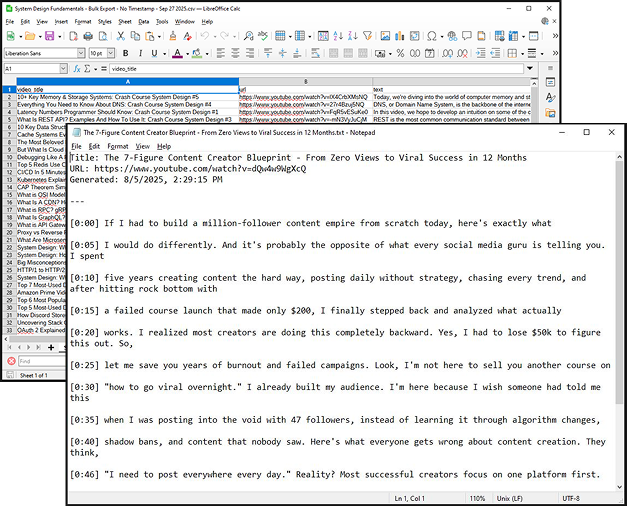
- Supports SRT, VTT, CSV, and TXT. Ready to use in video editors, spreadsheets, or note apps
- Bulk export YouTube channels or playlists with one URL. No manual work required
- Free for single videos. Bulk plans start at $1.99/month, not $40+
- No signup required to start. Just paste a URL and download
Why Choose ClipTranscribr for YouTube transcript and subtitle exports?
Fast, scalable transcript processing from single videos to large playlists and channels
Don't waste hours manually copying captions or waiting on slow tools. ClipTranscribr lets you bulk download YouTube transcripts and subtitles in SRT, VTT, TXT or CSV format in minutes, even for large playlists or channels. It works by pulling the captions YouTube already stores on each video and packaging them into the format you choose.
- Single video: export in seconds
- Medium playlists (40-50 videos): around 1-2 minutes
- Large playlists (300 - 350 videos): around 3 minutes
Download clean, ready-to-use transcripts and subtitles
Get structured files perfect for editing, captioning, or analysis, with or without timestamps. Unlike copying text directly from YouTube, ClipTranscribr delivers properly structured files you can immediately open in a video editor, spreadsheet, or text tool. You can export:
Bulk export flexibility. Scale without friction
Whether you need a single video transcript or hundreds at once, ClipTranscribr adapts. Export YouTube channels or playlists in one click, no manual work required. Simply paste a channel or playlist URL, choose your format, and ClipTranscribr queues and downloads every available transcript automatically. No browser extensions, no scripts, no technical setup needed; just a URL and a download.
Choose Your Plan. Or Use Free Forever
Whether you need a quick transcript for a single video or want to download hundreds at once, ClipTranscribr makes it simple. No hidden fees. Transparent pricing. Get started instantly.
Free (No signup needed)
Instantly export single YouTube videos as SRT, VTT or TXT.
- No payment info needed.
- No login required.
- Perfect for one-off transcripts, captions or note-taking
Need more volume? Upgrade to one of our paid bulk plans below.
Trial
Start your bulk transcript exports with our affordable Trial Plan. Enjoy 25 transcripts every month at just $1.99; perfect for creators and small teams testing the power of bulk exports without big commitments. Upgrade seamlessly when you're ready for more volume with our Starter and Pro plans.
- 25 YouTube transcripts per month
- Bulk channel/playlist extraction
- CSV + TXT export formats
- Timestamp options available
- Email support
Starter - Most Popular
Perfect for individual creators and students. Extract YouTube transcripts from entire channels and playlists in seconds. Get organized CSV and TXT files with timestamps. Email support included.
- 350 YouTube transcripts per month
- Bulk channel/playlist extraction
- CSV + TXT export formats
- Timestamp options available
- Email support
Pro
Designed for power users, agencies, and growing teams. Everything in Starter plus 4x more transcripts, priority support, and early access to new features. Perfect for heavy content research and analysis.
- 1,500 YouTube transcripts per month
- All Starter features included
- Priority email support
- Early access to new features
Perfect for:
Students & Educators
Convert YouTube lecture videos and full course playlists into clean, searchable text files for study notes, offline review, and accessible course materials. Whether you're a student trying to quickly find a specific topic across hours of recorded lectures, or an educator creating transcripts for students with hearing disabilities, ClipTranscribr turns entire educational channels into ready-to-use text in minutes, not hours.
Content Creators & Repurposers
Turn your video library into reusable written content without spending hours transcribing. Bulk export full transcripts or subtitles from your own channel to repurpose into blog posts, social media captions, email newsletters, or video scripts. ClipTranscribr handles the extraction so you can focus on creating, not copying and formatting text by hand.
Video Editors & Captioners
Download properly formatted SRT or VTT subtitle files for client videos, YouTube uploads, or captioning workflows. ClipTranscribr pulls the existing caption track directly from YouTube and delivers a clean, correctly timed subtitle file in seconds. Ideal for editors working on playlists or channels who need subtitle files in bulk without the back-and-forth.
Researchers, Analysts & Marketers
Extract transcripts from YouTube channels or playlists into CSV format for competitive research, content audits, trend analysis, and data mining. Instead of watching hundreds of videos manually, import structured transcript data directly into a spreadsheet and search, filter, or analyze it at scale. ClipTranscribr turns hours of video content into structured, queryable data you can act on immediately.
Podcasters & Audio Producers
If your podcast episodes are published on YouTube, ClipTranscribr lets you bulk export episode transcripts as clean text or subtitle files; ready to use as show notes, SEO-friendly episode descriptions, or repurposed written content. Stop spending time manually writing up what you already said. Export your entire back catalogue in one go and put that content to work across your website and social channels.
Transcript Export Requirements
& What You Should Know:
- Videos must have captions or transcripts available.
- Videos and playlists must be public.
- Videos and playlists cannot be restricted, private, or unlisted.